Architecture diagrams
Architecture diagrams are maintained as text source so changes remain reviewable. Mermaid source and rendered accessible SVG output are committed with the component each diagram explains.
Every diagram must include surrounding prose that states:
- its purpose;
- actors and responsibilities;
- trust boundaries and data flow;
- relevant security assumptions; and
- provider-specific differences.
The catalogue covers product context, container/components, request and deployment sequences, provider-selection/state, AWS and Azure topologies and identity, Terraform state, policy, logging, trust boundaries/threat paths, and incident timelines.
Available rendered diagrams
| View | Purpose and accessible alternative text | Source | Rendered output |
|---|---|---|---|
| System context | People submit requests or configure the platform; GitHub reviews the deterministic proposal; exactly one optional cloud destination receives an approved deployment. | system-context.mmd |
system-context.svg |
| Provider selection | An installation moves from unconfigured to a selected provider and mode, then locks the provider after activation; mismatched requests are rejected. | provider-selection.mmd |
provider-selection.svg |
| Interface flow | The portal, API, and CLI converge on one application service and route to only the installation's selected simulation adapter. | interface-flow.mmd |
interface-flow.svg |
| Container/components | User interfaces, application service, policy, provider modules, GitHub review, OIDC, and state boundaries. | container-components.mmd |
container-components.svg |
| Proposal sequence | Request normalization, policy, local ready_for_review bundle creation, and separate operator GitHub handoff. |
proposal-sequence.mmd |
proposal-sequence.svg |
| Protected deployment and rollback | Exact-commit gates, protected approval, OIDC, concurrency, health, and rollback loop. | protected-deployment-rollback.mmd |
protected-deployment-rollback.svg |
| AWS topology and identity | AWS sandbox/enterprise account separation, controls, and environment-bound IAM OIDC. | aws-topology.mmd |
aws-topology.svg |
| AWS deployed resources | Expected bootstrap, target-account networking, private EKS, identity, audit, and budget resources represented by the AWS Terraform roots. | aws-deployed-resources.mmd |
aws-deployed-resources.svg |
| Azure topology and identity | Azure sandbox/enterprise subscription separation, controls, and environment-bound federation. | azure-topology.mmd |
azure-topology.svg |
| Azure deployed resources | Expected bootstrap, target-subscription networking, private AKS, identity, logging, vault, and budget resources represented by the Azure Terraform roots. | azure-deployed-resources.mmd |
azure-deployed-resources.svg |
| State model | Local immutable proposal state and separate external plan/deployment evidence. | state-model.mmd |
state-model.svg |
| Policy flow | Common guardrails, provider policy, deterministic bundle, and friendly denial. | policy-flow.mmd |
policy-flow.svg |
| Logging flow | Request, review, provider, runtime, alert, and audit evidence paths. | logging-flow.mmd |
logging-flow.svg |
| Trust boundaries | User, application, GitHub review, OIDC, provider, state, and threat paths. | trust-boundaries.mmd |
trust-boundaries.svg |
| Incident timeline | Detect, freeze, preserve, contain, approve, recover, verify, and close. | incident-timeline.mmd |
incident-timeline.svg |


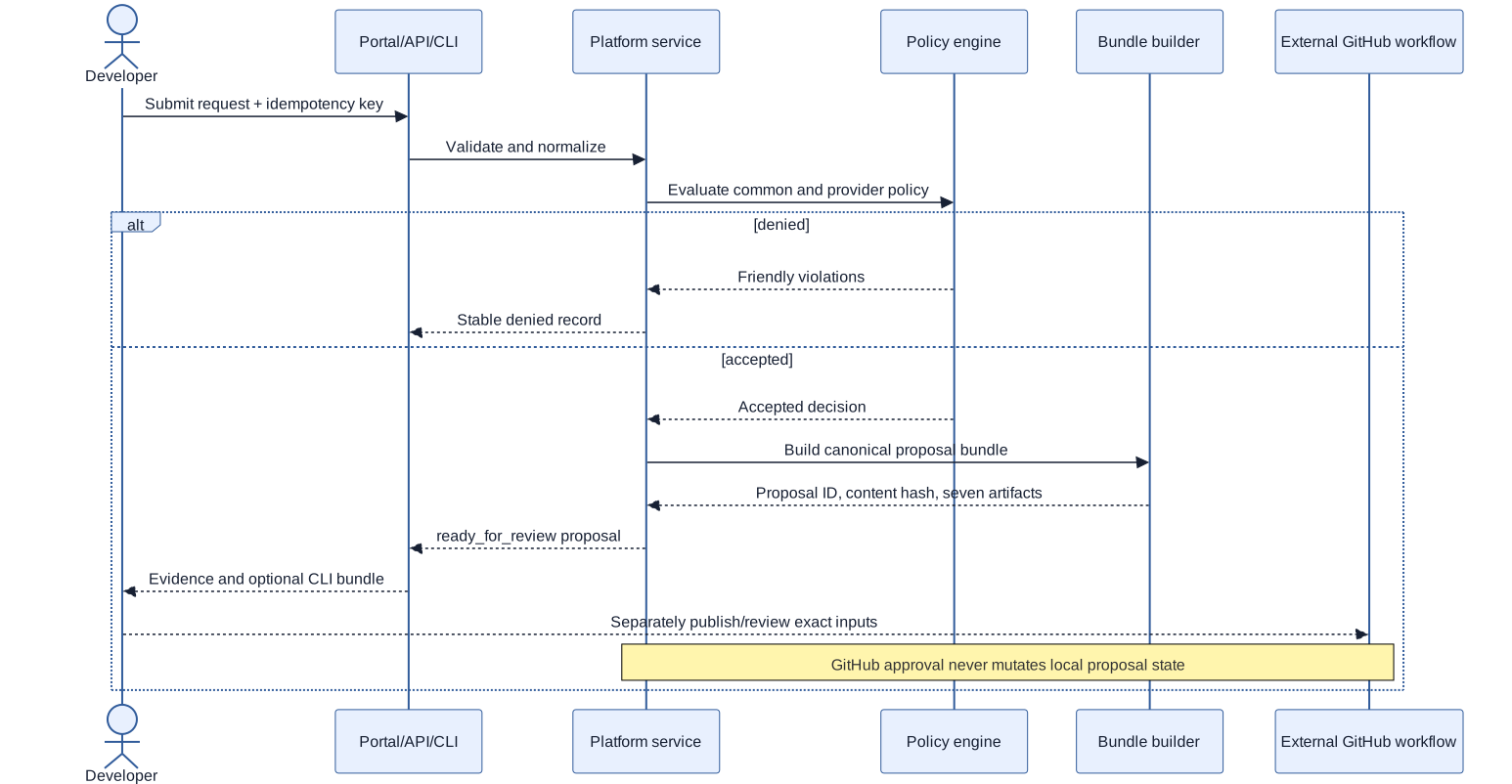


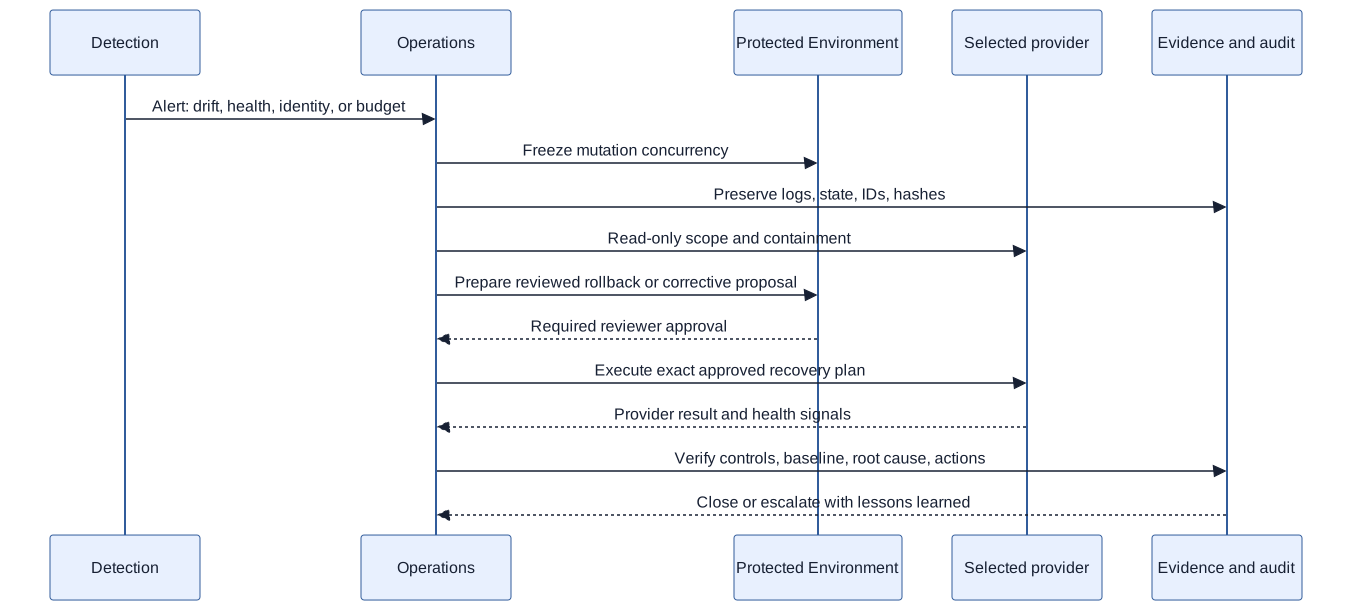
The SVG links above are the accessible, committed renderings for readers who do not have Mermaid installed. The source comments and surrounding prose state the same relationships in text for readers using a screen reader or a text-only environment.
Local rendering
From the repository root, install the pinned renderer and render every source:
npm ci --prefix tools/diagrams
scripts/render-diagrams.sh
scripts/check-rendered-diagrams.sh
With no argument, the renderer refreshes the committed output directory. To render into another directory, use the explicit output option:
temporary_dir=$(mktemp -d)
trap 'rm -rf "$temporary_dir"' EXIT
scripts/render-diagrams.sh --output-dir "$temporary_dir"
scripts/check-rendered-diagrams.sh --rendered-dir "$temporary_dir"
To verify deterministic output, render twice and compare checksums:
scripts/render-diagrams.sh
first=$(shasum docs/diagrams/rendered/*.svg)
scripts/render-diagrams.sh
test "$first" = "$(shasum docs/diagrams/rendered/*.svg)"
Every SVG receives a deterministic content-only SHA-256 fingerprint tied to
its .mmd source, Mermaid configuration, Puppeteer configuration, and package
lock. The checker verifies matching source/output basenames, missing and orphan
files, and the expected fingerprint in both the temporary and committed
outputs.
CI runs Mermaid on ubuntu-24.04 into a clean temporary directory, proving
that every current source renders without overwriting committed SVGs. It then
runs the freshness checker. The workflow intentionally does not compare SVG
bytes across operating systems; browser and layout bytes can vary by platform.